



AC/USB-A/USB-C Tablet Charging Cabinet – OEM Specs for Channel Brands
 Nov 09, 2026|
 View:25
Most charging-cabinet catalogs are written for end users. This one is written for the buyer who has to resell the product: distributors, OEM brand owners, AV and IT integrators, and tender resellers who need to know what is genuinely configurable before a SKU goes on a price list.
A modern power charging cabinet is no longer a steel box with a power strip bolted inside. It is a platform: one chassis family, three port architectures (AC, USB-A, USB-C PD), two mounting logics (wall mounted and floor standing), and a capacity ladder from 16 to 72 bays. Your margin depends on how much of that platform you can re-spec without paying for new tooling.
1. Form Factor Comes Before Port Count
The first OEM decision is not how many bays. It is where the unit will stand, because mounting logic drives depth, door design, weight, crate size and therefore landed cost.
Wall mounted: fixed to structure, 8–20 bays, shallow depth, zero floor footprint, usually a single 13A feed
Floor standing: 20–60 bays, front-serviceable, lockable, stable at full load, the workhorse of channel volume
Mobile cart: casters and a handle—a separate SKU family, not a variant of the cabinet
A wall mounted tablet charging cabinet is usually specified by a facilities team that cannot give up floor area: 10–20 tablets, one feed, and a lock the site key can open. Set bay pitch at 32–35mm so a 10.9-inch tablet inside a rugged case still clears the door, and check the hinge side against the wall return before you approve the drawing. Even a USB charging cabinet for tablets that weighs under 20kg needs two fitters and a template to hang level, so put that in the installation note rather than in the fine print.
A wall mounted phone charging cabinet follows the same logic at a smaller pitch: 8–16 handsets, 22mm bays, 100–140mm depth. These are corridor and staff-room products—devices stay visible to staff but out of reach of visitors, which is why hospitals and clinics order them in pairs.
The floor standing charging cabinet is where the volume sits. A 30–40 bay floor unit ships knocked down, fits four to a 40HQ, and can be re-badged across three or four brands from a single production run. That re-badging capability, not the steel price, is the actual economics of mobile device charging cabinet wholesale.
2. Port Architecture: AC, USB-A, and USB-C PD
Three architectures, and almost every mature OEM range ends up carrying all three, because the installed base is mixed and no single port type survives a five-year product cycle on its own.
AC: one socket per bay (UK / EU / US / AU), user supplies the adapter. Highest wattage per bay, best for notebooks, mixed fleets and anything with a 90W+ brick
USB-A: 5V/2.1A–2.4A fixed per port, sealed harness, lowest BOM, still correct for older iPads and Android fleets
USB-C PD: 20W–100W per port with PD negotiation, the only architecture that stays current through a tablet refresh
A USB C charging cabinet is now the default request for any fleet bought after 2023. If your catalog still leads with USB-A, you are selling into the refurbishment market rather than the refresh market—and refresh budgets are three to five times larger.
When a buyer asks for a charging cabinet with USB C ports, confirm four things before you quote: PD wattage per port, whether the total PD budget is shared or dedicated per bay, whether the ports carry data (needed for sync), and whether the PD modules are field-replaceable. A cabinet that needs a factory return to swap one dead port is a service cost you will absorb for the whole warranty period.
A USB charging cabinet for tablets built around 5V/2.1A modules cannot be pushed to PD by swapping cables. The power board, the port modules, the harness gauge and the thermal design all change together. This is the single most common spec error we see in channel quotations, and it is always discovered after the container has shipped.
3. Capacity Tiers: 30, 32, 36, 40 and Above
Tender documents specify capacity in four different ways, and the numbers are not interchangeable. Read them against the bay drawing, never against the catalog headline.
30 positions: typically a 5×6 or 3×10 grid with 30 cables. A 30 device charging cabinet is often the entry SKU for a single classroom or a small office floor
32 positions: the most common mid-tier chassis in K-12 tenders—one class set plus two spares. A charging cabinet 32 devices deep also fits through a standard storeroom door, which a 40-bay unit does not
36 ports: usually the same shell as the 32 with a denser divider set. A 36 port tablet charging cabinet only makes sense if the pitch stays at 30mm or more
40 bays: a 40 bay laptop charging cabinet needs 45mm+ pitch, deeper drawers and a power budget north of 2.5kW
48–72 bays: high-density storage, split power distribution, casters rated for the full loaded weight
Above 40 bays you are into large capacity device charging cabinet territory, and the engineering changes character: two separate power feeds, a load table per bank, doors that one person can open safely, and a crate that may no longer fit a standard tail-lift. A 60-bay unit designed as one welded box is a delivery problem waiting to happen.
4. One Chassis, Three Device Types
The same shell can leave the factory as a smartphone charging cabinet, a tablet unit or a notebook unit. What changes is bay pitch, depth, cable retention and power budget—not the tooling.
| Device mix | Bay pitch | Power per bay | Design note |
|---|---|---|---|
| Smartphones | 18–22mm | 10–20W | Shallow depth, short cable, high bay count |
| Tablets | 28–35mm | 20–65W PD | Divider set, case clearance, vented back panel |
| Notebooks | 40–55mm | AC or 65–100W PD | Reinforced shelf, thermal derating, 3-point lock |
| Mixed fleets | 35 + 45mm | AC + PD | Split busbar, labelled bays, interchangeable kits |
A notebook charging cabinet needs more than wide bays. A 15.6-inch laptop at 65W PD throws roughly three times the heat of a tablet, so the divider set must be vented, the rear panel needs airflow, and the power budget has to be quoted as a total rather than a per-port figure.
That is why most channel brands eventually stop selling three separate ranges and sell a multi device charging cabinet instead: one chassis, three divider kits, three power options, one spare-part catalogue. Fewer SKUs to forecast, more configurations to quote, and a service engineer who only has to learn one platform. A smartphone charging cabinet for a hotel lobby and a notebook charging cabinet for a design studio can leave the same line, in the same crate, under two different brand names.
5. Security: Locks, Access Control, Physical Resistance
A secure device charging cabinet has to answer three questions: who can open it, how hard is it to force, and what happens when a device goes missing.
Cam lock, two keys, master-keyable to a site system
PIN, RFID, IC card or fingerprint with an opening log
1.2–1.5mm steel, three-point locking bar, anti-pry lip on the door edge
Anchoring kit: four M8 fixings into wall or floor, specified rather than assumed
A lockable laptop charging cabinet adds two requirements. The door must not be defeatable by flexing the frame, and the bay pitch must be wide enough that a 15.6-inch notebook cannot be levered out through the gap when the door sits ajar. Ask for the pry test and the door deflection figure, not the steel thickness alone.
For overnight-storage tenders the spec usually becomes a secure mobile device storage and charging cabinet: full-perimeter lock, anchored to structure, cable pass-through grommets rather than open slots, and a written key or credential policy the site can actually follow. A cabinet nobody can audit is not secure, it is merely locked. If your customer is a school tablet charging cabinet supplier tender, expect the credential policy to be requested in writing before the board signs off.
6. Power Management Is the Real Engineering
The difference between a 90-dollar power charging cabinet and a 400-dollar one is rarely the steel. It is the board behind it.
A charging cabinet with power management should give you per-bank current limiting, sequenced soft start with a 0.5–2 second stagger between banks, a total draw cap that matches the site's ring main, over-temperature derating, and surge plus leakage protection. Anything less is a power strip with better marketing.
Without sequencing, 30 devices starting at 08:00 will trip a 16A MCB in a room nobody surveyed. That is not a product failure, it is a specification failure—and it is the most common reason a first container comes back as a warranty claim instead of a repeat order.
For channel brands, power management is also a documentation feature. The load table and the test report are what let your customer pass a school board, an IT audit or a hospital estates review without a site visit from the factory.
7. Sync and Provisioning
A tablet charging and syncing cabinet is a different electrical product from a charge-only cabinet. It needs USB data lines on every bay (USB 2.0 minimum), a host connection with predictable port mapping, and firmware that does not brown out when 32 devices enumerate at the same moment.
When a customer asks for a device charging cabinet with data syncing, five answers decide the quote:
USB 2.0 or USB 3.0 on each bay?
One host, or a host per bank?
Does the host enumerate 32 devices, or 32 hubs it cannot address individually?
Apple Configurator, ADB, fastboot and Chrome Education Upgrade compatible?
Sync on all bays, or a dedicated sync bank plus charge-only bays?
Get those five wrong and you ship a cabinet that charges perfectly and syncs nothing—usually discovered on installation day, with your integrator already on site and the invoice already issued.
8. Compartment Design and Serviceability
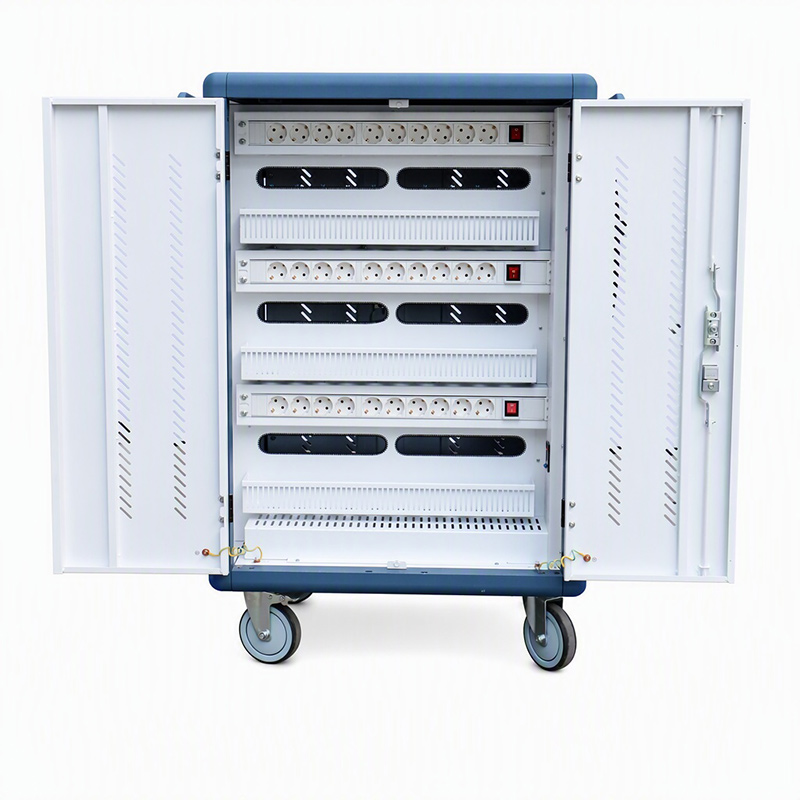
A charging cabinet with individual compartments solves three field problems at once: cable tangling, device mixing, and heat concentration. A shared shelf solves none of them and saves about 8% of BOM.
Specify it as five numbers rather than a description: bay pitch, divider material (ABS 94V-0 or powder-coated steel), divider height, cable exit geometry, and the label system. A bay that is 2mm too narrow will reject every rugged case on the market, and nobody discovers it until the first carton is opened at the customer site.
For a charging cabinet for student devices, individual compartments also give you 1:1 accountability: bay 14 belongs to child 14, and a missing tablet is visible at a glance rather than at the end of term. In a school, that single design decision prevents more disputes than any warranty clause.
9. Vertical Specs That Sell Themselves
Channel brands win deals by having a ready answer for each vertical instead of one generic spec sheet. These five cover most of the tender volume.
Education: a charging cabinet for schools lives on soft-start, a key or RFID lock, replaceable caster sets and 32–36 bays. The tender pack matters as much as the hardware
Corporate: a charging cabinet for offices needs PIN or RFID access, a counter-height footprint, cable retention clips and a finish that survives a client-facing floor
Healthcare: a charging cabinet for hospitals needs a sealed wipe-clean interior, medical-grade earthing, near-silent cooling and documentation that survives an infection-control audit
Public lending: a charging cabinet for libraries needs barcode-friendly bay labels, a public-facing lock, overnight lock-down and 16–32 bays at lending-desk height
Hospitality: a charging cabinet for hotels is judged on front-of-house finish, silent fans, 8–16 bays and cable routing that does not look like IT equipment
Note what repeats across all five: individual compartments, a documented power budget, and a lock that matches the site's key system. The differences are finish, depth and documentation, which is exactly where OEM customization earns its margin.
10. The OEM Customization Matrix
This is the table to send to a factory before you design a catalog page. Every row is a real decision that changes either the BOM, the MOQ or the lead time.
| Parameter | Standard | OEM options |
|---|---|---|
| Mounting | Floor standing | Wall bracket kit; a wall mounted tablet charging cabinet and a wall mounted phone charging cabinet share one bracket family |
| Ports | USB-A 5V/2.1A | AC, USB-C PD 20/45/65/100W, or mixed; PD modules field-replaceable on the USB C charging cabinet platform |
| Sync | Charge only | USB 2.0 or 3.0 data per bay; sync bank option; host mapping table supplied as a document |
| Capacity | 16 / 20 / 30 / 36 | 32 and 40 bay shells, plus 48–72 bay frames for a large capacity device charging cabinet project |
| Locking | Cam lock, 2 keys | Master key, PIN, RFID, IC, fingerprint; three-point bar standard on any lockable laptop charging cabinet |
| Interior | ABS dividers, fixed | Vented steel dividers, adjustable pitch—the option buyers of a charging cabinet with individual compartments ask for most |
| Power | 10A total, no sequencing | Sequenced soft start and per-bank limiting, i.e. a charging cabinet with power management |
| Market | EU plug | UK / US / AU / CN plugs, 110V or 220–240V, region-specific manuals |
| Branding | Silk-screen logo | Powder-coat colour match, laser-etched plate, private-label carton, branded manual, own model numbering |
Two rows in that table decide whether a range feels premium or generic: port architecture and interior adjustability. A multi device charging cabinet with a fixed divider set is a single SKU. The same shell with two divider kits is a range—and ranges are what distributors can build a catalog page around, including a notebook charging cabinet version and a smartphone charging cabinet version from the same crate.
11. Wholesale Terms, Certification and Documentation
For mobile device charging cabinet wholesale, the unit price is the least interesting number on the quotation. What decides whether a SKU works for you is the certification set, the documentation, the MOQ split and the spare-part availability.
As a school tablet charging cabinet supplier, your tender pack normally needs CE-LVD, CE-EMC, RoHS, UKCA, RCM, a UL 62368-1-ready electrical design, a load table, bay drawings, a three-year body warranty and a spare-parts list with part numbers. Missing any one of those turns a two-week award into a two-month argument.
Also clarify who owns the tooling, who holds the test reports, and whether the reports name your brand or the factory's. A secure mobile device storage and charging cabinet sold into a public tender is judged on paper long before anyone opens the door—so the paper has to carry your name.
12. Catalog Builds: Eight Configurations That Cover Most RFQs
Channel brands rarely need fifty SKUs. Eight builds, each a chassis plus a kit plus a document set, cover the majority of incoming enquiries—and they are the ones worth putting on a catalog page, in this order.
Classroom starter. A charging cabinet for schools in a 30-bay shell, USB-C PD 45W, key lock, casters. A 30 device charging cabinet covers one class set plus spares and still fits a standard storeroom door
District fleet. A charging cabinet for student devices at 36 bays with numbered compartments and a spare-port plan; route the tender pack through a school tablet charging cabinet supplier who can issue bay drawings. A 36 port tablet charging cabinet is normally the same shell as the charging cabinet 32 devices base, with a denser divider set
Corporate floor. A charging cabinet for offices at 20–24 bays, RFID access, matte finish, 65W PD. This build is usually ordered inside a mobile device charging cabinet wholesale programme, alongside meeting-room AV
Hospital ward. A charging cabinet for hospitals at 16–20 bays, sealed interior, medical-grade earthing—normally a secure device charging cabinet variant with an audit-capable lock rather than a key
Public lending. A charging cabinet for libraries at lending-desk height, 24 bays, barcode labels, public-facing lock and an overnight lock-down
Hotel lobby. A charging cabinet for hotels at 8–12 bays, silent fans, front-of-house finish, phone-first pitch with a tablet kit as the option
Notebook tender. A 40 bay laptop charging cabinet with 45mm pitch and AC or 100W PD bays—quote it as a lockable laptop charging cabinet, because notebook buyers ask about the lock before they ask about price
MDM rollout. A device charging cabinet with data syncing with a host mapping table in the box; where devices are stored overnight it becomes a secure mobile device storage and charging cabinet with the same interior
Each build is a fixed BOM, a fixed document set and a fixed carton—which is exactly what makes it quotable by a reseller who has never visited the factory. Anything outside the eight is a project, and projects should be priced as projects.
13. FAQ for Channel Buyers
Can one chassis serve both wall mounted ranges?
Yes. A wall mounted tablet charging cabinet and a wall mounted phone charging cabinet normally share a bracket family, a door frame and a lock; only the divider kit, pitch and depth change. That lets a channel brand list two SKUs with one tooling investment and one spare-part set.
Is a USB C charging cabinet backward compatible?
Only if the PD modules negotiate down to 5V and the cable retention suits smaller connectors. Ask for the compatibility list in writing: an older iPad on a 65W PD port will charge, but a device with a damaged connector may not, and that becomes your support case rather than the customer's. Ask for the tested device list for the exact charging cabinet with USB C ports you are ordering; bench results from a different PD module are not evidence.
Which capacity should a first order carry?
Stock the two tiers your market actually tenders. In K-12 that is usually a 30 device charging cabinet for single classrooms and a 36 port tablet charging cabinet for full class sets; add a 40 bay laptop charging cabinet only once you have notebook demand confirmed, because the deeper shell does not convert back to tablets cleanly.
Do all SKUs need power management?
Every SKU above 20 bays should. Below that, a simple current-limited strip is defensible. But once a customer has bought one charging cabinet with power management, they will specify it for every site—so it is usually cheaper to make it standard than to maintain two BOMs.
Individual compartments or shelves?
Compartments, in almost every case. A charging cabinet with individual compartments costs more to build and less to support: no tangled bundles, no mixed devices, no arguing about which tablet was charged. The only buyers who genuinely prefer shelves are those storing sealed stock rather than live devices.
Can a floor unit be converted to a cart?
Not safely. A floor standing charging cabinet is designed to sit still with a full load; adding casters to a shell that was not braced for movement is how doors sag and frames twist. If your customer needs mobility, quote the cart platform instead and keep the cabinet for fixed rooms.
What does OEM actually change?
More than a logo, less than a new product. Realistic OEM scope is bay pitch, port mix, lock type, plug standard, colour, carton and manual. Anything beyond that—a new door, a new chassis, a new thermal path—is a tooling project, and it should be quoted as one.
How do the verticals differ in practice?
Mostly in documentation and finish rather than hardware. A charging cabinet for offices is bought on access control and appearance; a charging cabinet for hospitals is bought on cleanability and earthing; a charging cabinet for libraries is bought on public usability; a charging cabinet for hotels is bought on how it looks in a lobby; a charging cabinet for schools is bought on whether it survives a term. One platform, five spec emphases.
Charge-only or sync?
If the end user has an MDM or a provisioning workflow, sell a device charging cabinet with data syncing. If they hand devices out already configured, charge-only is enough, and a tablet charging and syncing cabinet is margin you do not need to spend. Ask the question before you quote, not after.
14. RFQ Checklist Before You Build a Catalog Page
Send this list to a factory and you will get a specification instead of a brochure:
Device list and maximum size with case, including whether the fleet is a charging cabinet for student devices deployment or a mixed corporate one
Capacity: 30 / 32 / 36 / 40 bays, or a large capacity device charging cabinet above 48
Port mix per bay, with PD wattage stated if the SKU is a charging cabinet with USB C ports
Power budget total and the ring main available on site
Lock type and whether master-keying is required
Mounting: floor standing charging cabinet, wall bracket or cart
Sync requirement, host mapping and MDM platform
Certification set for each target market
Branding scope and private-label packaging
Target landed price, MOQ and container plan
Two entries on that list cause most of the rework. State the capacity as a bay drawing as well as a number—a charging cabinet 32 devices deep and a 30-bay unit are not the same footprint and do not ship the same quantity per container. And state the fleet refresh date: a USB C charging cabinet bought for a 2024 fleet is a different quote from one bought to bridge a legacy USB-A install for another two years.
Final Takeaway
A power charging cabinet is a platform product, not a commodity box. The chassis, the port modules, the divider kits, the lock and the documentation are all separate decisions, and each one is a chance to either widen your catalog or widen your support costs.
For channel brands, the winning configuration is usually the boring one: a multi device charging cabinet platform in 30, 32 and 40 bay shells, USB-C PD as the default port with a USB-A kit for legacy fleets, individual compartments throughout, sequencing on every board, and a tender pack that is ready before the RFQ arrives. Add a secure device charging cabinet variant for overnight storage and you cover most of the demand without doubling your SKU count.
Lucktech Group builds exactly that range: AC, USB-A and USB-C architectures on shared tooling, 8 to 72 bays, wall mounted and floor standing shells, OEM branding and packaging, and export documentation for distributors, brand owners and tender resellers. Tell us the devices, the market and the container plan, and we will send back a specification you can put in front of a customer—a USB charging cabinet for tablets today, a tablet charging and syncing cabinet for the next tender.
Need an OEM Specification for Your Market?
Contact: sales@lucktech-group.com | WhatsApp: +86-13157459197
Get OEM Spec & Bulk Quote

Recent News
1.2025 Global Charging Cabinet Exhibitions Highlight
2026-03-182.How to Choose a Tablet Charging Cabinet Manufacturer for Wholesale
2026-10-143.Wholesale Tablet Charging Cabinet for Schools – 30 / 36 / 48 / 64 / 80 Bay OEM Manufacturer
2026-10-194.AC/USB-A/USB-C Tablet Charging Cabinet – OEM Specs for Channel Brands
2026-11-09